AI-assisted penetration testing: Claude and custom models (HCKAI1) (HCKAI1)
Cybersecurity, ICT Security
A practical course showing what artificial intelligence can genuinely do today in authorized penetration testing. Through hands-on exercises, participants will explore the boundary between tasks handled by Claude as a leading cloud model and those suited to a small model running on their own hardware, keeping test data within the organization. They will set up and measure such a model themselves.
The third day focuses on what to test first in applications, with particular emphasis on applications created with AI (vibe coding) and the security of AI applications themselves. The course is not tied to any specific operating system or distribution; the procedures work on Windows, macOS and Linux.
THIS TRAINING COURSE WILL HELP YOU:
- Identify which parts of a penetration test Claude can handle, which it refuses and where its outputs must be verified
- Use Claude and the Claude Code agent to plan tests, evaluate tool outputs and review code
- Set up a small model on your own hardware and measure which tasks it can handle
- Decide which data may be sent to a cloud model and which must remain with a custom model
- Determine what to test first in a web application and which weaknesses are typical of applications created with AI
- Assess an AI application or chatbot against the OWASP Top 10 for LLM applications
- Use AI to prepare both technical and management reports from a test
WHO SHOULD ATTEND?
- The course is intended for penetration testers, security specialists, SOC analysts, server administrators and developers who want to understand what AI can genuinely save them when looking for security weaknesses. It is also suitable for teams developing applications with AI who need to know how to assess them, and for managers deciding whether to introduce AI into security work. The course is also suitable for participants who are just starting with penetration testing
COURSE LOCATION AND AVAILABLE DATES
Filter dates:
DateLocationFormat
LanguagePrice
BrnoBrno (hybrid)
Hybrid
This session takes place simultaneously in the classroom and online. You can choose your preferred way to attend during registration.
Czech
984 € 1,191 € incl. VAT
PrahaPraha (hybrid)
Hybrid
This session takes place simultaneously in the classroom and online. You can choose your preferred way to attend during registration.
Czech
984 € 1,191 € incl. VAT
PrahaPraha (hybrid)
Hybrid
This session takes place simultaneously in the classroom and online. You can choose your preferred way to attend during registration.
Czech
984 € 1,191 € incl. VAT
BrnoBrno (hybrid)
Hybrid
This session takes place simultaneously in the classroom and online. You can choose your preferred way to attend during registration.
Czech
984 € 1,191 € incl. VAT
PrahaPraha (hybrid)
Hybrid
This session takes place simultaneously in the classroom and online. You can choose your preferred way to attend during registration.
Czech
984 € 1,191 € incl. VAT
BrnoBrno (hybrid)
Hybrid
This session takes place simultaneously in the classroom and online. You can choose your preferred way to attend during registration.
Czech
984 € 1,191 € incl. VAT
Need this course in English?
Public courses are usually delivered in Czech, but this course is also available in English. We can arrange private training for your team online, at your premises or in our classrooms, and tailor the content to your needs.
For groups of around 4 or more participants, private training can already be comparable in price to booking individual places on a public course. Send us your requirements and we’ll recommend the best format and provide an exact quote.
Request training in English
Course content:
Hide details
-
Penetration testing and the role of AI
-
Penetration testing phases, test types and tester role
-
Engagement rules: written authorization, scope and communication with the client
-
Legal framework: Cybersecurity Act, NIS2 and AI Act
-
How large language models and AI agents work
-
Hallucinations and the obligation to verify every finding
-
Limits of cloud-based models
-
Tasks Claude excels at: analysis, code review, planning, output evaluation and report writing
-
Dual-use tasks: what the model refuses, why and how this varies between models and versions
-
Principles for using commercial models in security work and their safeguards
-
Test data in the cloud: contractual terms, retention and data classification
-
When to use a custom model
-
Platform-independent lab environment
-
Isolated containerized lab with intentionally vulnerable training applications
-
Tools run in containers instead of a single specialized distribution
-
Isolating the lab from the corporate network and rules for safe work
-
Claude as a tester's assistant and agent
-
Prompts with engagement context, role and required output format
-
Test plans and checklists based on methodologies (OWASP, PTES)
-
Analysis of scanner outputs and prioritization of discovered services
-
Claude Code in the terminal: permissions, step approval and project rules with engagement scope
-
Logging all agent steps for auditing and reporting
-
Workshop
-
Build a test plan for a lab company and process reconnaissance results
-
Map where Claude helped, made mistakes and refused across a set of tasks
-
Setting up a custom model
-
Tools for running models: Ollama, LM Studio, llama.cpp and vLLM
-
Choosing a model from open model families (Llama, Qwen, Mistral, Gemma and others)
-
Quantization and memory requirements
-
Running models on a laptop, workstation and GPU server
-
What small models can do
-
Tasks they handle well: sorting and extracting tool outputs, log summaries and finding classification
-
Tasks they cannot handle sufficiently: long multi-step tasks, extensive code and complex reasoning
-
Benchmark task set: quality, time and cost per task for Claude and a custom model
-
Decision matrix for choosing a model based on the task and data sensitivity
-
Custom models in the workflow
-
OpenAI-compatible interfaces and tool calling with small models
-
Division of labor: the custom model processes sensitive data and the cloud model handles general tasks
-
Connecting tools through the Model Context Protocol (MCP)
-
Security knowledge base
-
RAG over public sources: CVE, CISA KEV, EPSS and MITRE ATT&CK
-
Custom knowledge base from internal documentation and previous tests
-
Verifying that the model cites sources and does not make them up
-
Workshop
-
Set up a custom model and use it to process the same tasks Claude handled on day one
-
Compare the results and complete the decision matrix
-
Web application: where to start
-
OWASP Top 10 and order of checks based on impact
-
AI-assisted analysis of captured HTTP traffic from a testing proxy
-
Designing test cases and verifying them in the lab
-
Distinguishing a genuine finding from a false positive
-
Applications created with AI (vibe coding)
-
Why generated code works yet is often insecure
-
Typical weaknesses: missing access control for data, keys and passwords in code and the browser, exposed databases and storage
-
Other common findings: unvalidated inputs, outdated dependencies, default configurations and debugging interfaces in production
-
Checklist for an application built over a weekend
-
Agent review of the entire repository and verification of findings
-
Source code
-
Combining AI with static analysis tools (Semgrep, CodeQL)
-
Designing a fix and verifying that it removed the weakness
-
Security review as part of AI-assisted development
-
AI application security
-
OWASP Top 10 for LLM applications
-
Prompt injection, data leakage and excessive agent privileges
-
Testing a corporate chatbot and AI application with garak and PyRIT
-
Reporting and final exercise
-
Assessing finding severity (CVSS) and reporting for technical staff and management
-
Reviewing AI outputs and tester responsibility
-
Final exercise: testing an AI-created training application from planning through reporting
-
Custom development: integration with your tools, security checks in application development and team training
-
Prerequisites:
-
User-level experience with the command line (Windows, macOS or Linux) and a basic understanding of computer networks (IP addresses, ports and protocols). Previous penetration testing experience or completion of the HCK1 course is not required; the course explains the necessary fundamentals. Basic Python knowledge and experience with an AI assistant are an advantage. Participants who want to explore classical penetration testing techniques in greater depth can complement this course with Penetration Testing and Ethical Hacking (HCK1).
-
Schedule:
-
3 days (9:00-17:00)
-
Price per person:
-
984.00 € (1 190.64 € incl. 21% VAT)
Training and learning environment
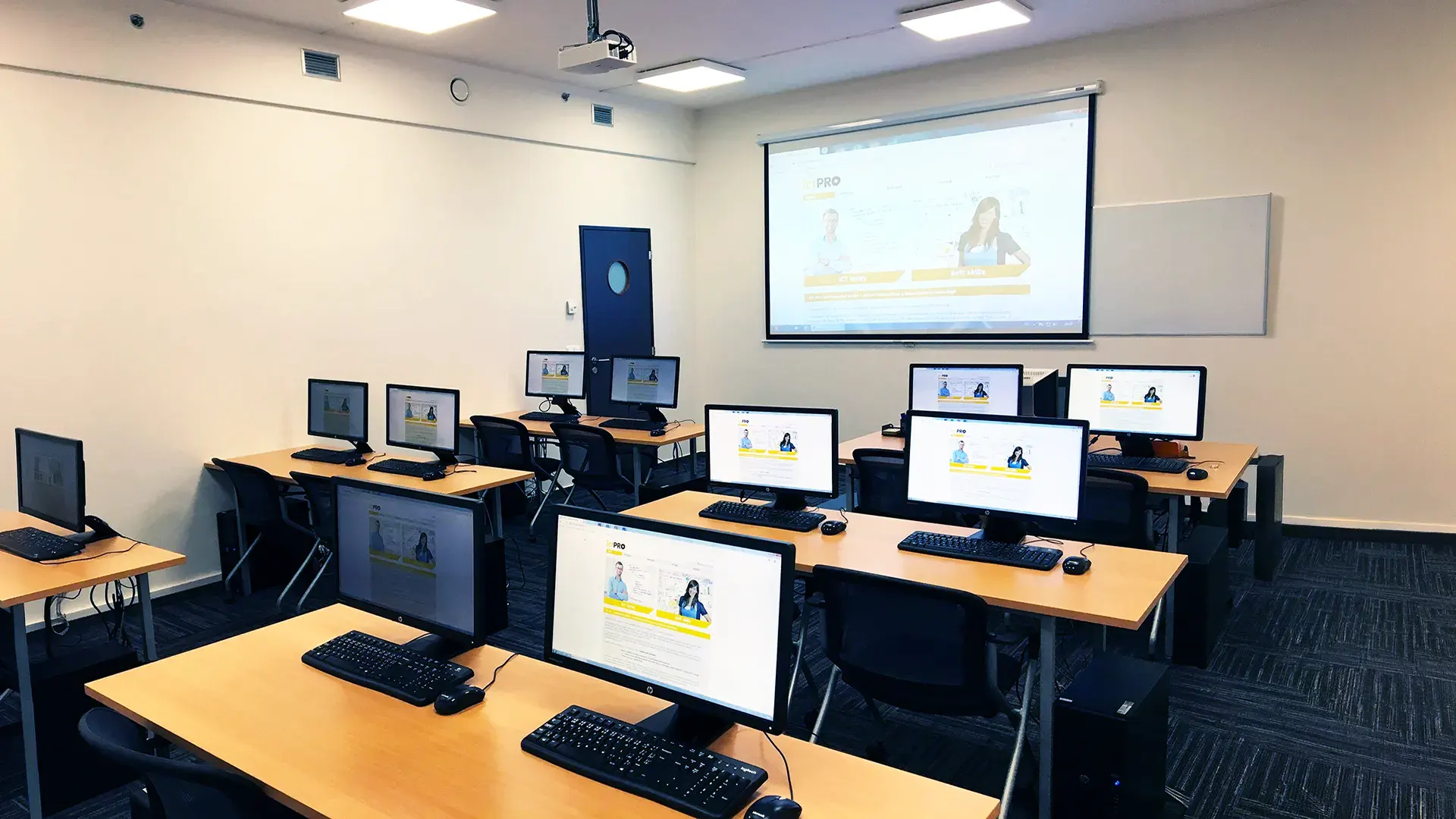 What does the environment for in-person IT courses look like?We hold training courses in our own classrooms equipped with modern computer equipment for each participant and a large projection screen. Each workstation is fitted with a powerful computer for seamless practical exercises, and the environment supports a calm, friendly atmosphere during training.
 Do I need to bring my own laptop to the classroom IT course?Our training rooms are fully equipped, so you do not need to bring your own laptop. A modern computer with all necessary hardware and software is ready for you at your workstation.
 Will you receive an official certificate after completing an IT course?Yes, upon successful completion of the training course, you will receive an official ICT Pro certificate confirming your participation and acquired technical skills. You can use it to verify your qualifications or add it to your professional profile.
 Where can you find our training center in Brno?The premises of the ICT Pro training center are located on the 1st floor of the COMGUARD building at Sochorova 38 in Brno. Positioned on the border of Žabovřesky and Komín, the location is easily accessible by both car and public transport.
 Where can you find our training center in Prague?The premises of the ICT Pro training center are located on the 1st floor of the Opatov Park building at Líbalova 1, Prague 11 – Chodov. The location provides a comfortable environment for your education with convenient access.
 What facilities and refreshments are available to you during training breaks?Our training centers feature a fully equipped kitchenette for a comfortable break during your courses. The facilities include a coffee machine, microwave, kettle, and a wide selection of drinks and snacks.
 What beverage refreshments are available during your course?A beverage station with a coffee machine, teas, syrups, and water is at your disposal throughout the entire training session. You can enjoy a coffee or another drink of your choice anytime during breaks.
 What light refreshments are provided for you during the courses?During course breaks, participants can enjoy light sweet snacks, pastries, and fruit syrups to mix their own drinks. Fresh water dispenser and plates are also available for your convenience.
 Should I bring my own snacks to ICT Pro training?There is no need to. A wide selection of savory snacks, sweet biscuits, and snack bars is available for you during breaks. Boost your energy for all-day focus right inside the training center premises.
 Can you spend training breaks in the fresh air?Yes, an outdoor terrace is available at our training center. During breaks between learning sessions, you can relax in the fresh air in a pleasant green environment.
 Where can you relax during course breaks?Our training center features a spacious outdoor terrace with seating options. During breaks between learning sessions, you can step outside to relax and recharge in the fresh air.