Networking, Synology
SIT (Synology Intensive Trainings) programi, profesyonel sertifikali egitmenlerin Synology NAS'inizdan en iyi şekilde nasil yararlanacaginizi ögrettigi resmi Synology egitim oturumlari sunar. Artik iki günlük yogun SIT egitim modülleri DSM Architect ve Backup Architect sertifika seçenekleriyle birlikte mevcuttur.
Egitimler, bir Synology NAS geliştirme ve uygulama projesinin planlanmasi ve yürütülmesine odaklanir. Donanimin nasil planlanacagini ve ölçeklendirilecegini ve farkli ag ortamlari için uygun şekilde nasil yapilandirilacagini ögreneceksiniz. Ayrica sistem güvenligi ve bakim konulari hakkinda da bilgi edineceksiniz. Ayrica merkezi verilerinizi müşteriler ve diger konumlarla nasil senkronize edeceginizi, ekiplerinizle eş zamanli olarak metinleri ve elektronik tablolari nasil düzenleyeceginizi ve kendi posta ve sohbet sunucunuzu nasil kuracaginizi da ögreneceksiniz.
DSM Architect ve Backup Architect kurslari Synology sertifikasyonu ile neticelenir. Bu 60 dakikalik test egitimden hemen sonra uygulanir ve sonuçlar tamamlandiktan hemen sonra katilimcilara bildirilir. Sertifika testini başariyla tamamlayan tüm katilimcilar Synology logolu resmi bir sertifika alacaktir.
Alinan Synology sertifikasi yalnizca Türkiye'de geçerlidir. Başka bir ülkeden geliyorsaniz ve resmi sertifikaya ihtiyaciniz varsa, lütfen bize bildirin ve sizi uygun Synology Egitim Merkezine yönlendirelim.
KURS AŞAGIDAKILER IÇIN TASARLANMIŞTIR:
- Bayiler, satiş görevlileri, teknik personel, BT danişmanlari ve sistem entegratörleri;
- Synology ürünleri ve bunlarin uygulamada etkin kullanimi ile ilgilenenler;
- Resmi Synology sertifikasyonu ile ilgilenenler.
EGITIMSEL YAKLAŞIM
- Ders, pratik aliştirmalar ve egitmenin deneyim ve görüşlerinin katilimcilarla sürekli paylaşimini içerir.
- SIT egitimleri sertifikali egitmenlerimiz tarafindan yürütülmekte ve çevrimiçi veya hibrit olarak düzenlenmektedir.
- Her egitim oturumu klasik sinif içerigi ve uygulamali gösterimlerden oluşur ve DSM Architect ve Backup Architect kurslari son bir Synology sertifika testi ile sonuçlanir.
EGITIM ŞEKLI
Kurs, Türkçe dilinde çevrimiçi (online) olarak saglanmaktadir. Tüm katilimcilar pratik aliştirmalarin yapildigi çevrimiçi laboratuvarlara erişebilmektedir.
Kurs 6-12 katilimcidan oluşan gruplara açiktir. Bu, yeterli bireysel yaklaşimi ve sorular için alan da dahil olmak üzere her katilimci için gerekli etkileşimi saglar.
PROGRAM: 2 gün (9:00 - 17:00)
KURS ÜCRETI: 250.00 $ (Bu son fiyattir. Kurs fiyati üzerinden aşagida gösterilen KDV fatura edilmeyecektir.)
DIL: TÜRKÇE
EGITIM FIYATI
Synology Intensive Trainings kurslari, kurslarimizin mezunlarina yönelik standart %10 indirimimizden yararlanamaz.
GEREKEN BILGI BIRIKIMI
Genel HW ve ag oluşturma bilgisi, temel ve gelişmiş Synology NAS hizmetlerinin yapilandirilmasi, donanim planlama ve ölçeklendirme, NAS güvenligi ve bakimi veya Synology DSM Architect (SIT1TR) kurs seviyesi bilgisi.
COURSE LOCATION AND AVAILABLE DATES
This public course is delivered online only, so you can attend remotely without travelling to a classroom. The same course can also be delivered in person as private training at your premises.
For technically demanding courses, prepared remote labs are provided, so you do not need to install anything locally.
8–9 Dec 2026
250 €
TURKISH
Need this course in English?
Public courses are usually delivered in Czech, but this course is also available in English. We can arrange private training for your team online, at your premises or in our classrooms, and tailor the content to your needs.
For groups of around 4 or more participants, private training can already be comparable in price to booking individual places on a public course. Send us your requirements and we’ll recommend the best format and provide an exact quote.
Request training in English
Course content:
Hide details
-
Active Backup for Business için iki günlük modül – Altyapı Yedekleme kursu
-
Sürüm oluşturma ve tekilleştirilmiş yedeklemenin temelleri
-
Tam Windows, Hyper-V ve VMware istemci/sunucu yedekleri
-
SMB ve Rsync aracılığıyla kolay dosya tabanlı yedeklemeler
-
Kurtarma medyasını kullanarak geri yükleme
-
Sanal makine ve sunucu yedeklerinin geri yüklenmesi ve doğrudan sanallaştırılması
-
SaaS ortamlarının Office365/Gsuite yedekleri için Active Backup
-
Yerel SaaS yedeklemeleri için temel bilgiler
-
Veri, e-posta, kişiler, takvimler, SharePoint yedekleri
-
Tek tek öğeleri ve tüm hesapları geri yükleme
-
Yedekleme işlerini yönetme ve erişme
-
Hyper Backup - veri yedekleme ve kurulum
-
Veri yedekleme ve LUN´lara genel bakış
-
Yerel ve uzak yedekleme ayarları ve gereksinimleri
-
USB ortamını ve özelliklerini kullanma
-
Tek tek verileri geri yükleme ve yedekleme işlerini tamamlama
-
Mevcut yedekleme işlerini bağlantılandırma
-
Snapshot Replication - yerel ve şirket dışı Snapshot´lar ile veri yedekleme
-
Yerel ve uzak anlık görüntülerin ayarlanması
-
DSM arayüzü üzerinden yönetici kurtarma
-
Windows Explorer kullanarak kullanıcı kurtarma
-
Aktif bir NAS arızası durumunda yük devretme senaryoları
-
USB Copy 2.0 - otomatik içe ve dışa aktarma
-
USB ortamından NAS´a otomatik veri aktarımı
-
Klasörlerin USB ortamına otomatik olarak aktarılması: "Plug and Backup" (Tak ve Yedekle)
-
Prerequisites:
-
GEREKEN BİLGİ BİRİKİMİ: Genel HW ve ağ oluşturma bilgisi, temel Synology NAS hizmetlerinin yapılandırılması veya Synology NAS Fundamentals (SYN1EN) ve DSM Architect (SIT1TR) kurs seviyesi bilgisi.
-
Recommended previous course:
-
Synology DSM Architect in Turkish (SIT1TR)
-
Recommended follow-up course:
-
Synology ActiveProtect Architect in Turkish (SIT5TR)
-
Schedule:
-
2 days (9:00-17:00)
-
Price per person:
-
250.00 € ( 302.50 € incl. 21% VAT)
Training and learning environment
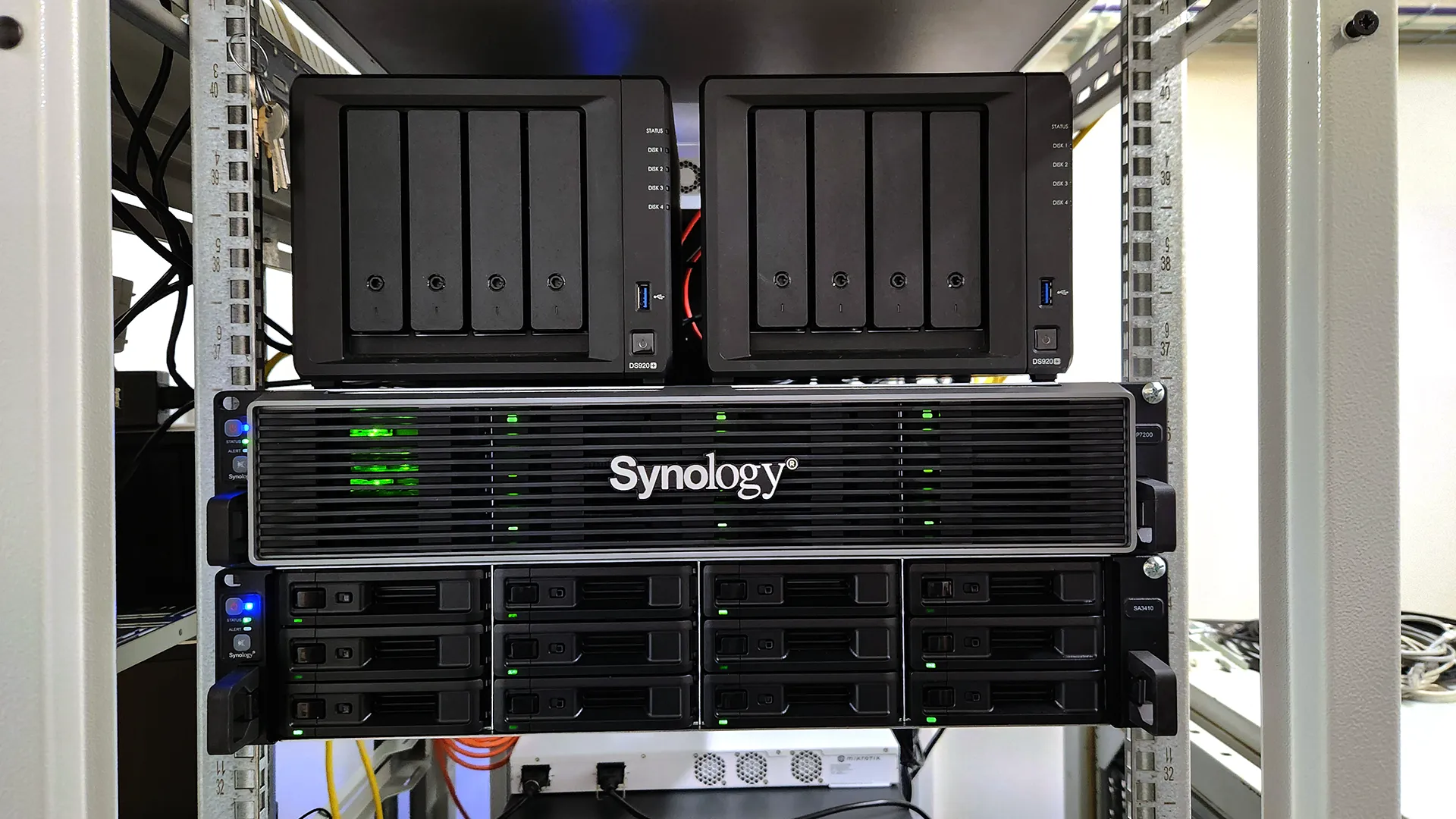 Synology ActiveProtect Architect LabA preview of the Synology lab designed for SIT certification training focused on ActiveProtect Architect.
 Synology DSM and Backup Architect LabA preview of the Synology lab designed for SIT certification training focused on DSM and Backup Architect.
 Synology ActiveProtect Architect LabA preview of the Synology lab designed for SIT certification training focused on ActiveProtect Architect.
 Synology DSM and Backup Architect LabA preview of the Synology lab designed for SIT certification training focused on DSM and Backup Architect.
 Synology Surveillance Architect LabA preview of the Synology lab designed for SIT certification training focused on Surveillance Architect.
 Synology Surveillance Architect LabA preview of the Synology lab designed for SIT certification training focused on Surveillance Architect.
 Photo from the Synology training sessionSynology in-person training sessions are held in our fully equipped, modern IT classrooms in Brno.
 Photo from the Synology training sessionSynology in-person training sessions are held in our fully equipped, modern IT classrooms in Brno.
 Photo from the Synology training sessionSynology in-person training sessions are held in our fully equipped, modern IT classrooms in Brno.
 Photo from the Synology training sessionSynology in-person training sessions are held in our fully equipped, modern IT classrooms in Brno.
 Photo from the Synology training sessionSynology in-person training sessions are held in our fully equipped, modern IT classrooms in Brno.
 Photo from the Synology training sessionSynology in-person training sessions are held in our fully equipped, modern IT classrooms in Brno.
 What does the environment for in-person IT courses look like?We hold training courses in our own classrooms equipped with modern computer equipment for each participant and a large projection screen. Each workstation is fitted with a powerful computer for seamless practical exercises, and the environment supports a calm, friendly atmosphere during training.
 Do I need to bring my own laptop to the classroom IT course?Our training rooms are fully equipped, so you do not need to bring your own laptop. A modern computer with all necessary hardware and software is ready for you at your workstation.
 Will you receive an official certificate after completing an IT course?Yes, upon successful completion of the training course, you will receive an official ICT Pro certificate confirming your participation and acquired technical skills. You can use it to verify your qualifications or add it to your professional profile.
 Where can you find our training center in Brno?The premises of the ICT Pro training center are located on the 1st floor of the COMGUARD building at Sochorova 38 in Brno. Positioned on the border of Žabovřesky and Komín, the location is easily accessible by both car and public transport.
 Where can you find our training center in Prague?The premises of the ICT Pro training center are located on the 1st floor of the Opatov Park building at Líbalova 1, Prague 11 – Chodov. The location provides a comfortable environment for your education with convenient access.
 What facilities and refreshments are available to you during training breaks?Our training centers feature a fully equipped kitchenette for a comfortable break during your courses. The facilities include a coffee machine, microwave, kettle, and a wide selection of drinks and snacks.
 What beverage refreshments are available during your course?A beverage station with a coffee machine, teas, syrups, and water is at your disposal throughout the entire training session. You can enjoy a coffee or another drink of your choice anytime during breaks.
 What light refreshments are provided for you during the courses?During course breaks, participants can enjoy light sweet snacks, pastries, and fruit syrups to mix their own drinks. Fresh water dispenser and plates are also available for your convenience.
 Should I bring my own snacks to ICT Pro training?There is no need to. A wide selection of savory snacks, sweet biscuits, and snack bars is available for you during breaks. Boost your energy for all-day focus right inside the training center premises.
 Can you spend training breaks in the fresh air?Yes, an outdoor terrace is available at our training center. During breaks between learning sessions, you can relax in the fresh air in a pleasant green environment.
 Where can you relax during course breaks?Our training center features a spacious outdoor terrace with seating options. During breaks between learning sessions, you can step outside to relax and recharge in the fresh air.