Templates in MS Word – automation and user-friendly design within reach (WORD2)
Microsoft Office, Word
Templates in MS Word help produce consistent, professional documents that follow company standards. This course shows how to build reusable templates, set styles and themes, prepare headers and footers and use building blocks to save time and reduce errors.
You will learn to automate documents using fields and document properties, create quick parts and form controls, protect and distribute templates with proper storage and permissions, and apply testing tips to ensure consistent formatting across the team.
THIS TRAINING COURSE WILL HELP YOU:
- Create and use document templates as corporate documentation base
- Define a set of styles and a document theme
- Use and build custom building blocks
- Store and protect document templates appropriately
WHO SHOULD ATTEND?
- Administrative staff wanting self-populating documents
- MS Word users who want to avoid long manual edits
- Champions creating templates for new colleagues
COURSE LOCATION AND AVAILABLE DATES
Praha + online (optional)
Need this course in English?
Public courses are usually delivered in Czech, but this course is also available in English. We can arrange private training for your team online, at your premises or in our classrooms, and tailor the content to your needs.
For groups of around 4 or more participants, private training can already be comparable in price to booking individual places on a public course. Send us your requirements and we’ll recommend the best format and provide an exact quote.
Request training in English
Course content:
Hide details
-
Document templates and their importance
-
Difference between a regular document and a template
-
How to create a template and save it for reuse
-
Creating a new document from a template
-
Basic elements of a document template
-
Prepare a set of predefined paragraph and character styles
-
Create and manage a custom document color set
-
Create a custom document theme and save it for reuse
-
Document automation
-
Use fields and document properties for dynamic content
-
Custom quick parts and AutoText entries
-
Working with form controls
-
Custom items in building block galleries
-
Recommendations and tips for user-friendly templates
-
Common template mistakes and how to avoid them
-
Guidelines for designing intuitive templates
-
Testing and optimizing templates for better user experience
-
Prerequisites:
-
Basic experience with MS Word and using styles for formatting.
-
Recommended previous course:
-
MS Word Today – Practical Skills for Modern Administration (WORD1)
-
Schedule:
-
1 day (9:00-17:00)
-
Price per person:
-
108.00 € ( 130.68 € incl. 21% VAT)
Selected customer reviews
Zebra Technologies CZ s.r.o., Aleksandra N.
Templates in MS Word – automation and user-friendly design within reach (
WORD2)
"The course was very interesting. Enough time for presentation, exercises and questions. Very friendly atmosphere. Great prepared coach. "
Training and learning environment
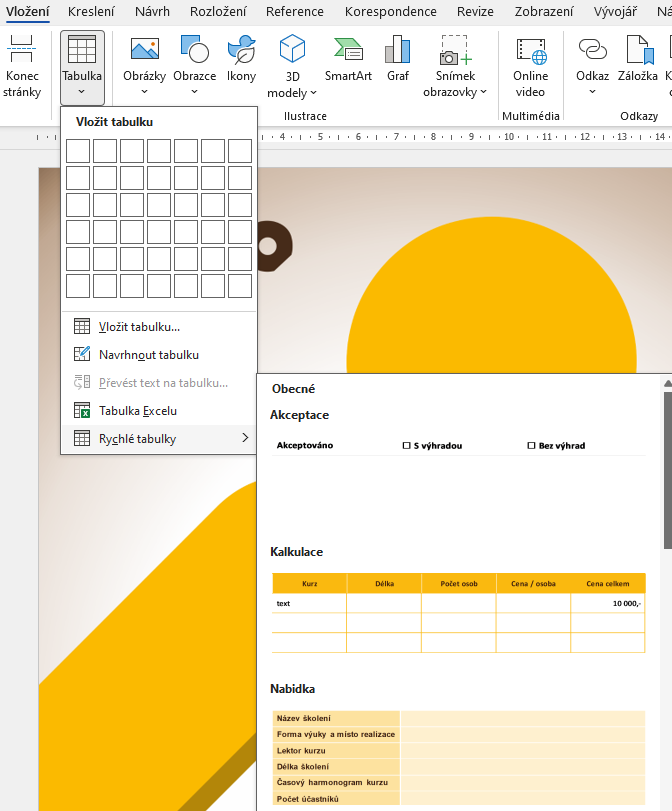 Is it possible to create custom table templates in Microsoft Word?Yes, this demonstration illustrates the ability to save custom-defined table formats to the Quick Tables menu for immediate recurring use in documents.
 Which keyboard shortcuts will speed up your work in Microsoft Word?Using the right shortcuts significantly speeds up text editing and formatting. The clear table lists shortcuts for inserting non-breaking spaces, quick paragraph selection, or updating fields.
 How to effectively use custom building blocks and templates in Microsoft Word?Our training will teach you how to create and manage your own gallery of building blocks in Microsoft Word for quickly inserting recurring elements like custom cover pages or headers. This significantly speeds up document creation and unifies their appearance according to corporate identity.
 What does the environment for in-person IT courses look like?We hold training courses in our own classrooms equipped with modern computer equipment for each participant and a large projection screen. Each workstation is fitted with a powerful computer for seamless practical exercises, and the environment supports a calm, friendly atmosphere during training.
 Do I need to bring my own laptop to the classroom IT course?Our training rooms are fully equipped, so you do not need to bring your own laptop. A modern computer with all necessary hardware and software is ready for you at your workstation.
 Will you receive an official certificate after completing an IT course?Yes, upon successful completion of the training course, you will receive an official ICT Pro certificate confirming your participation and acquired technical skills. You can use it to verify your qualifications or add it to your professional profile.
 Where can you find our training center in Brno?The premises of the ICT Pro training center are located on the 1st floor of the COMGUARD building at Sochorova 38 in Brno. Positioned on the border of Žabovřesky and Komín, the location is easily accessible by both car and public transport.
 Where can you find our training center in Prague?The premises of the ICT Pro training center are located on the 1st floor of the Opatov Park building at Líbalova 1, Prague 11 – Chodov. The location provides a comfortable environment for your education with convenient access.
 What facilities and refreshments are available to you during training breaks?Our training centers feature a fully equipped kitchenette for a comfortable break during your courses. The facilities include a coffee machine, microwave, kettle, and a wide selection of drinks and snacks.
 What beverage refreshments are available during your course?A beverage station with a coffee machine, teas, syrups, and water is at your disposal throughout the entire training session. You can enjoy a coffee or another drink of your choice anytime during breaks.
 What light refreshments are provided for you during the courses?During course breaks, participants can enjoy light sweet snacks, pastries, and fruit syrups to mix their own drinks. Fresh water dispenser and plates are also available for your convenience.
 Should I bring my own snacks to ICT Pro training?There is no need to. A wide selection of savory snacks, sweet biscuits, and snack bars is available for you during breaks. Boost your energy for all-day focus right inside the training center premises.
 Can you spend training breaks in the fresh air?Yes, an outdoor terrace is available at our training center. During breaks between learning sessions, you can relax in the fresh air in a pleasant green environment.
 Where can you relax during course breaks?Our training center features a spacious outdoor terrace with seating options. During breaks between learning sessions, you can step outside to relax and recharge in the fresh air.